Secure WordPress Access

Generate temporary access links for your WordPress site. Perfect for developers, agencies, and anyone who needs secure, time-limited access control.

Powerful Security Features

Everything you need to secure and control access to your WordPress site

Temporary Access Links

Generate secure, time-limited access links that automatically expire. Perfect for granting temporary access without sharing permanent credentials.

Coming Soon

Permission Control

Choose exactly what actions are allowed - login only, plugin management, theme access, or full admin permissions. Granular control for maximum security.

Flexible Duration

Set access duration from 15 minutes to 24 hours. Links automatically expire when the time limit is reached, ensuring security.

Coming Soon

Activity Logs

Comprehensive logging of all access attempts, successful logins, and actions performed. Keep track of who accessed what and when.

Coming Soon

IP Restrictions

Optionally restrict access to specific IP addresses for enhanced security. Perfect for known developers or office locations.

Emergency Lockdown

Instantly lock down your entire site with a single click. Revoke all active links immediately in case of security concerns.

How It Works

Simple, secure, and effective in just a few steps

1

Generate Link

Create a secure access link with custom duration and permissions from the SiteLock dashboard.

2

Share Securely

Share the generated link with your developer, designer, or team member who needs temporary access.

3

Automatic Expiry

The link automatically expires after the set duration, ensuring your site remains secure without manual intervention.

Intuitive Dashboard

Manage your site security with a clean, user-friendly interface
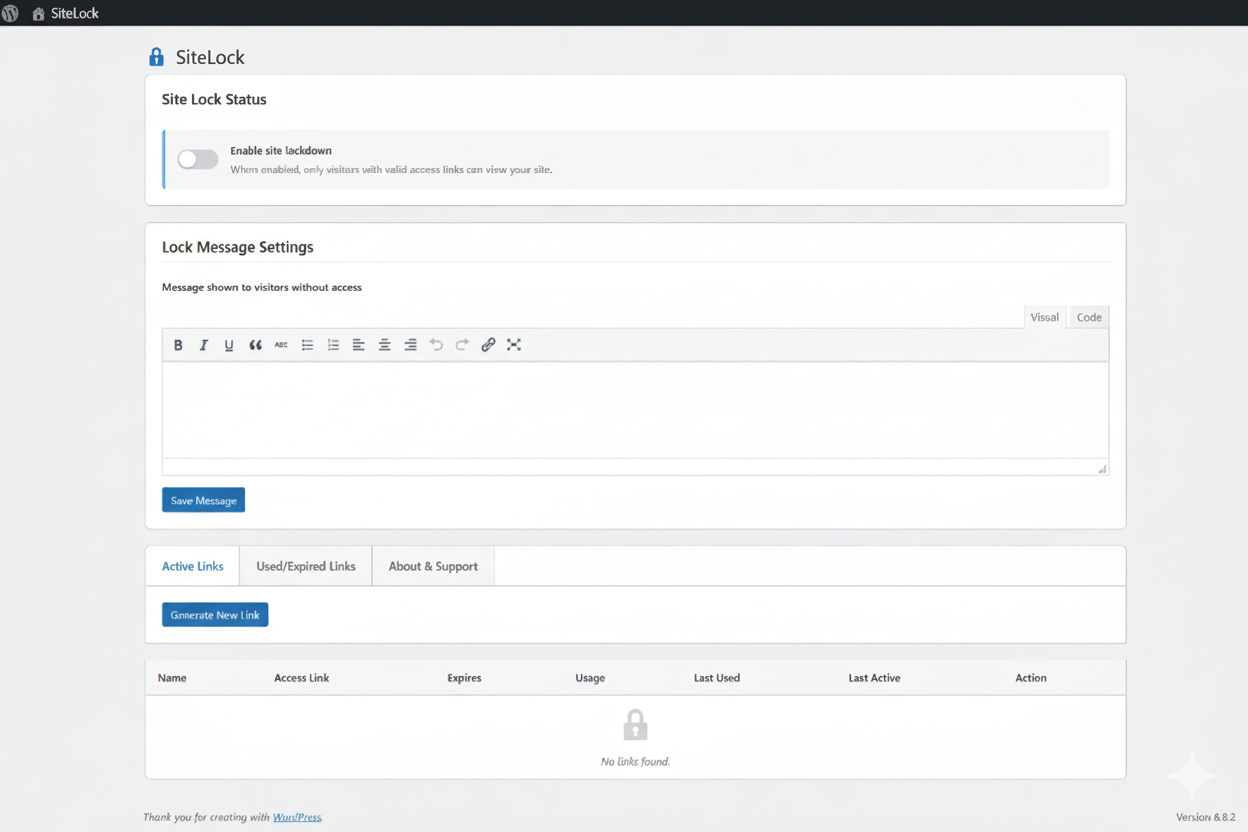
SiteLock Dashboard Interface

Simple Controls

One-click site lock toggle and intuitive link management

Real-time Status

Live updates on active links and usage statistics

Quick Actions

Generate, copy, and manage links with a single click

Perfect For

Various scenarios where secure, temporary access is needed

Web Agencies

  • • Grant client site access without sharing admin credentials
  • • Provide temporary access to freelancers and contractors
  • • Allow quality assurance testing with limited permissions
  • • Enable emergency access for urgent fixes

Business Owners

  • • Give developers secure access for maintenance
  • • Allow designers to update themes and content
  • • Provide support team access for troubleshooting
  • • Enable content managers to update specific sections

Developers

  • • Access client sites without permanent credentials
  • • Test plugin installations and configurations
  • • Perform emergency fixes with time-limited access
  • • Collaborate with team members on projects

Security-Conscious Users

  • • Minimize permanent admin account exposure
  • • Audit all access attempts and activities
  • • Control exactly what actions are permitted
  • • Revoke access instantly if needed

Ready to Get Started?

Everything you need to install, configure, and use SiteLock is documented in our comprehensive guide.

Need Help?

We're here to help you get the most out of SiteLock

Email Support

Get detailed help via email

[email protected]

Response Time

Quick response guaranteed

Within 24 hours

Support Hours

Available when you need us

Mon-Fri, 9 AM - 6 PM PKT